My scrapers fix themselves now
Anyone who has built software on scraped data knows the feeling. You write a scraper, it works, and a few weeks later it doesn’t. Nobody told you. The venue relaunched its website, renamed a CSS class, moved its agenda to a new URL, or put a cookie wall in front of it. Your code didn’t change, but it’s broken anyway.
That’s normal for scrapers. A website is not an API, and nobody who runs one owes you a stable format. Writing a scraper takes an afternoon. Keeping thirty-five of them working every night, for months, is where the time goes.
Everything on concertje comes from scrapers. Every venue, promoter and festival has its own one. Keeping them alive has been part of my week since the start.
Knowing when something breaks
A scraper that throws an error is easy to spot. The dangerous one keeps running and returns nothing, because from the outside that looks like a venue with no new shows.
concertje has posted to Discord since the beginning. After every scrape run, a health check looks at what happened and posts a digest in a channel. Over time that check got smarter:
- ❌ a run that failed, with the error
- 📉 a run that found far fewer events than its own baseline of the last ten runs
- 📄 a run where the listing loaded but the detail pages stopped producing events, which usually means the parser broke
- 🔇 and 📅 for runs that look fine but return wrong ticket statuses or dates that make no sense
The volume checks caught the most. A site that changes its markup rarely crashes the scraper. It just makes it find zero shows.
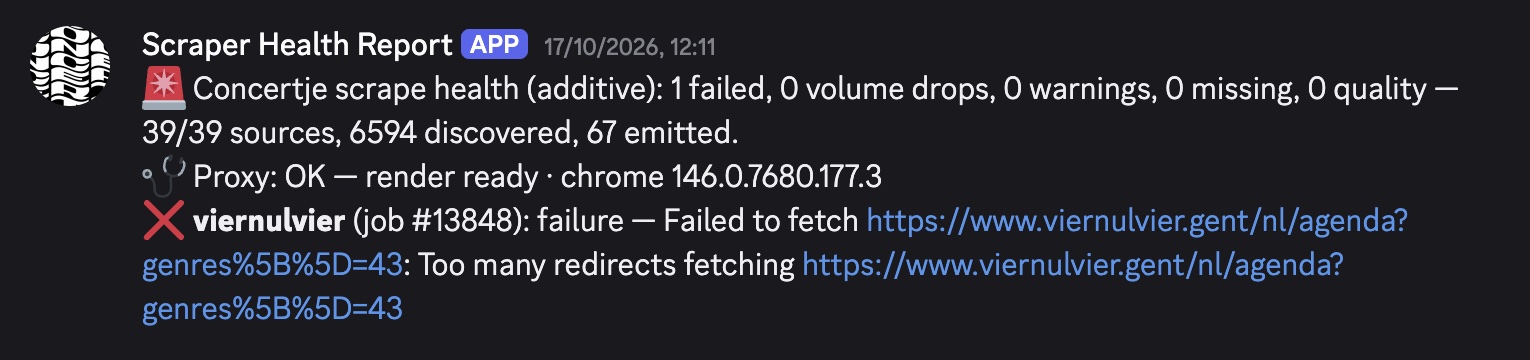 A typical digest: one source down, the error, and the proxy status.
The same fix, every time
After a few months I noticed I was doing the exact same thing every time one of those messages came in.
I copied the error from Discord and pasted it into a Claude Code session. I asked it to investigate. It fetched the live page, compared it to what the parser expected, and found the cause. We wrote a fix and a test. Then I did a dry run against the live site to check that the number of events matched the venue’s own agenda. If it did, I shipped it.
Only the error message changed from one time to the next. My part was mostly copy, paste, wait, and say yes, and steps that repeat like that can be written down.
Writing it down as a skill
So I did. In Claude Code, a skill is a markdown file with instructions for a specific kind of task. I wrote one called fix-scraper that describes exactly what I used to do by hand:
- Triage: check whether someone already fixed it in the last day. Check whether the proxy is down, because then it’s not the scraper’s fault. Do a live dry run, and if it works now, it was a blip and there’s nothing to fix.
- Fix: find the root cause on the live site, save the broken HTML as a test fixture, write a failing test, then fix the code.
- Prove it with a full live dry run, with no page limit, because a limited run hides pagination bugs. The event count has to match the venue’s own listing, and three random events have to have the right title, date, venue and ticket link.
- Add a changelog entry in the scraper’s package and run a simplify pass on the diff.
- Deploy once the scrape queues are empty, because a deploy restarts the workers. Merge to main and wait for the Railway deploy to succeed.
- Post the fix in the same Discord channel the error came from.
The most important part of the skill is the list of things it is not allowed to do. It may only change the broken scraper’s own package. It never writes to the production database. It never merges without a regression test, a green lint, typecheck and test run, and a passing dry run. Anything outside those rules ends as a pushed branch that waits for me. I only let it run without me because of those rules.
Letting it run on its own
Claude Code routines are saved Claude Code sessions that run in the cloud on your own subscription. Besides a schedule, you can start one with an API call: a POST with some text as input.
So when the health check finds a broken scraper, it now does two things. It posts the digest to Discord like before, and it sends the same lines to the scraper-fix routine. That starts a session with the fix-scraper skill, and the link to it goes in the Discord message so I can follow along.
A source that didn’t run at all stays out, because that’s a scheduling problem. And each source goes to the routine at most once a day, so a scraper that stays broken until its fix is live doesn’t start a new session every run.
What that looks like
Live Nation is a good example. At 18:12, the Live Nation scraper found 0 events, against a baseline of 548. The digest went to Discord, and the routine started.
It found that Live Nation’s search API had started answering with an HTTP 400 and the message “Missing siteId”. The fix was one parameter on the listing URL. It wrote a test for it, did a dry run that found 543 events against the 543 the API reported, wrote the changelog entry, merged and deployed. At 18:23 it posted the result in the same channel.
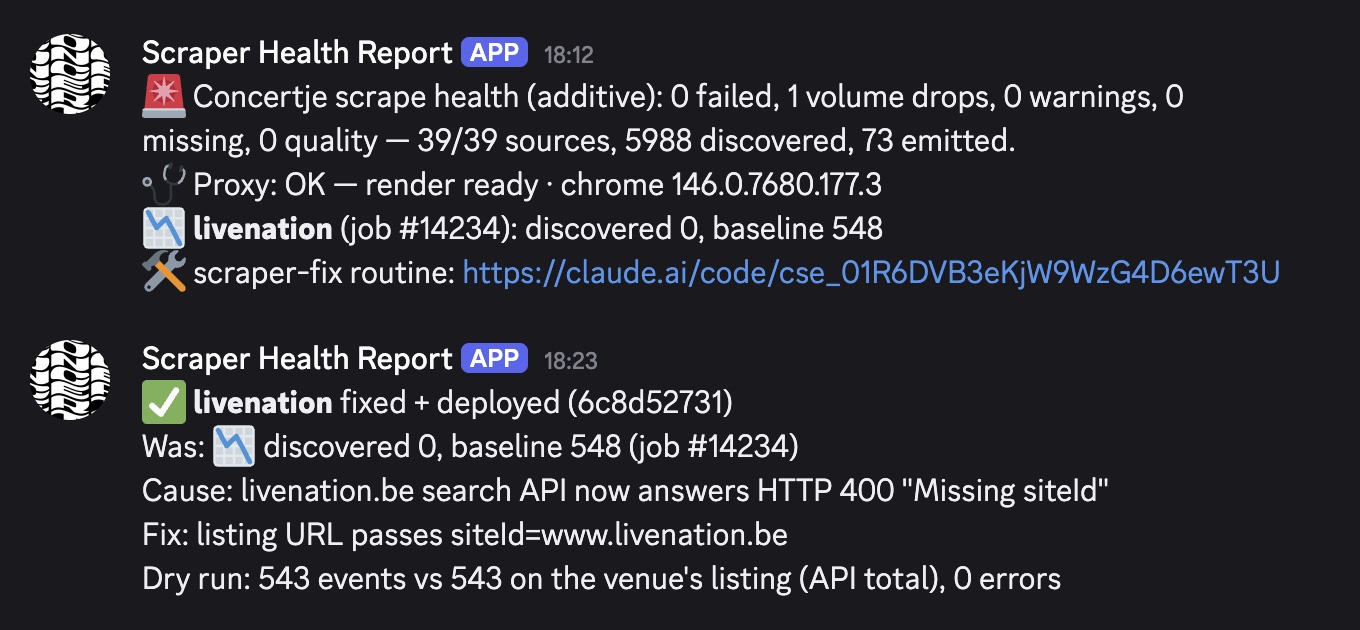 The break and the fix, eleven minutes apart.
I didn’t touch any of it. I read about it afterwards.
It doesn’t always need to fix something, either. A lot of breakages are a site that was slow for a minute or rate limited one run. The routine checks that first, sees the live run is fine, and stops there. That used to be me opening a session for nothing.
Routines over the API
This needed very little code. The skill is a markdown file. The trigger is one POST request. Everything in between, the debugging, the browser, the tests, the git work and the deploy, runs on my Claude subscription in a session I can open and read.
This isn’t the only routine concertje fires, either. A watcher checks festival news pages every hour, and when a festival posts something new, it starts a routine that reads the post and updates the lineup.
If your system already sends you a message when it needs a human, it’s worth asking whether that message could start a routine instead. Mine still sends me a message. I just don’t have to do anything about it anymore.